




Furniture websites are heavy by nature. Every product needs large photos from several angles, room scenes, fabric close ups and often a video. Add a homepage slider, a financing calculator, a review widget, a chat bubble, two or three tracking pixels and a popup, and a page that looks simple on the office computer can take a long time to become usable on a shopper's phone.
That matters twice. Shoppers on a slow page leave before they see the sofa, and Google measures how your pages perform for real visitors through a set of scores called Core Web Vitals. The names sound technical. The ideas behind them are not.
This guide explains what Core Web Vitals measure in plain English, how much they really affect rankings, how to check your own site in twenty minutes, and the fixes that make the biggest difference on furniture sites, in the order we make them. You do not need to be a developer to follow it, though you may need one for some of the fixes.
The short answer
Core Web Vitals are Google's three measures of how a page feels to real visitors: how fast the main content appears, how quickly the page responds to a tap, and how much the layout jumps while loading. Furniture sites usually fail them because of oversized product photos, too many third party scripts and cheap hosting. Check your scores in PageSpeed Insights and Search Console, then fix in this order: compress and resize images, load the main image first and the rest as shoppers scroll, remove unused apps and scripts, stop the layout jumping, then improve hosting. Judge the result on inquiries and sales, not on a perfect score.
Why furniture websites are slow
The causes are remarkably consistent from store to store.
Product photos uploaded at full size. Manufacturer images and photographer files are often many times larger than any screen needs. A category page with forty of them can weigh more than a short video.
Sliders and background video on the homepage. They load several large files before the shopper sees anything useful, and on phones many of them never finish.
Apps and plugins that add code to every page. Review carousels, financing calculators, chat widgets, wishlists, popups, heat maps and tracking pixels each load their own scripts, often from other companies' servers.
Leftover code. Apps that were uninstalled years ago can leave scripts behind in the theme, still loading on every visit for nobody.
Budget hosting and heavy themes. A slow server delays everything that follows, and a theme packed with features you never use still makes the shopper's phone download them.
None of this is unusual or anyone's fault. It is what happens when a site grows one helpful addition at a time without anyone checking the total.
Core Web Vitals in plain English
Google uses three measurements, each with a threshold it calls good.
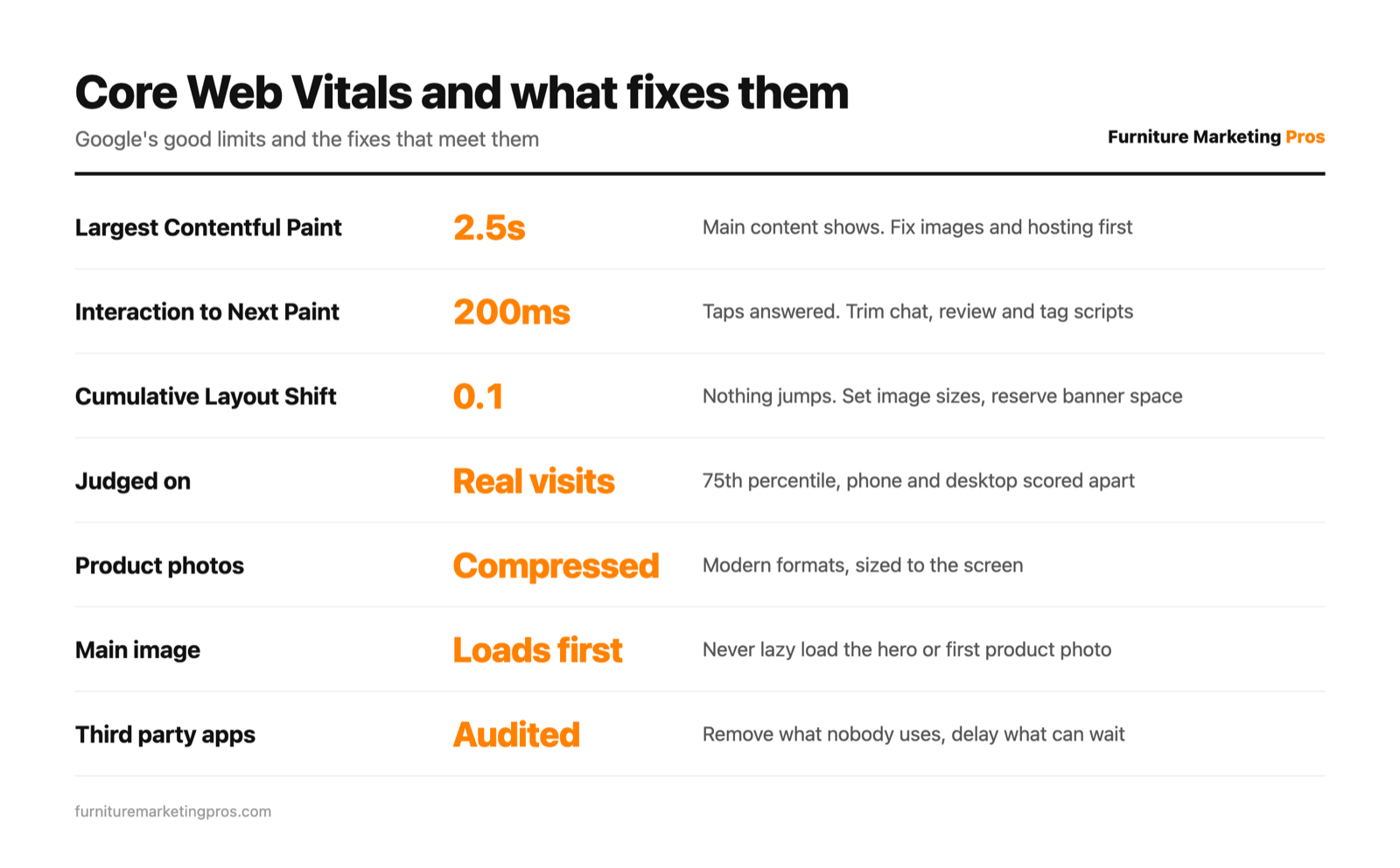
Largest Contentful Paint: how fast the main thing appears. It times how long the biggest visible element takes to show, which on a furniture site is usually the hero image or the main product photo. Google treats 2.5 seconds or less as good.
Interaction to Next Paint: how fast the page responds. When a shopper taps a color swatch, opens the menu or adds to cart, this measures how long the page takes to visibly react. Google treats 200 milliseconds or less as good. It replaced an older measure called First Input Delay in March 2024.
Cumulative Layout Shift: how much the page jumps. You know the moment: you go to tap a button and a banner loads above it, so you tap the wrong thing. This scores that movement. Google treats 0.1 or less as good.
Two details matter. Google judges each measure at the 75th percentile of real visits, so most of your shoppers need a good experience, not just the ones on fast connections. And it scores phones and desktops separately. Your phone scores are the ones to worry about, because that is where most furniture research happens, as our post on mobile first websites for furniture retailers explains.
How much speed really affects rankings
Honestly, less than many people selling speed fixes suggest, and more than owners who ignore it hope.
Google uses page experience, including Core Web Vitals, as a ranking signal, but it has been clear that relevance and helpful content come first. A fast page with thin content will not outrank a slower page that answers the shopper's question far better. Where pages are otherwise close, a better experience can help.
The bigger cost of a slow site is the shopper. A visitor who waits on a blank screen often goes back to the results and taps the next store. You paid for that visit with an ad click or earned it with months of SEO work, and you lost it before the page loaded.
So treat speed as part of a wider technical health check rather than a magic ranking lever. Our furniture store SEO audit checklist puts it in context alongside indexing, page titles and structured data.
How to check your own site in twenty minutes
You need two free Google tools and a phone.
PageSpeed Insights. Paste in a page address. The top section shows field data, meaning how real Chrome users experienced the page over the previous 28 days, and whether it passes Core Web Vitals. The section below is a lab test, a single simulated load with a score out of 100 and a list of suggestions. The field data is what Google uses. The lab score is a diagnostic.
Search Console. The Core Web Vitals report groups your pages into good, needs improvement and poor, separately for mobile and desktop, and shows which problem affects each group. Smaller sites may see a note that there is not enough data. In that case rely on the lab test and your own phone.
Your phone, on cellular data. Turn wifi off and open your homepage, your busiest category page, two best selling product pages and the landing page your ads point to. Count how long before you could actually shop, and notice anything that jumps.
Test those five page types rather than only the homepage. Category and product pages carry most of the traffic and most of the weight.
Fix one: product photos and lazy loading
Images are the biggest single cause of slow furniture pages, and the biggest single win.
Compress every image. Most photos can be made dramatically smaller with no difference a shopper would notice. Modern formats such as WebP and AVIF are smaller again for the same quality.
Serve images at the size they display. A thumbnail on a category grid should not be a full resolution photo shrunk by the browser. Most modern ecommerce platforms, Shopify included, can create resized versions automatically when the theme asks for them, so check that yours does.
Load images as the shopper scrolls. This is called lazy loading. Images further down the page load only when the shopper approaches them, so the first screen appears sooner.
But never lazy load the main image. The hero image and the first product photo are usually what Google times for Largest Contentful Paint. Lazy loading them makes that measure worse. Tell the browser to fetch that one image first instead.
Cap the gallery. Load the first few product photos and let the rest load when the shopper opens the gallery.
Fix two: the scripts you added and forgot
Every chat widget, review carousel, financing calculator, popup, heat map and tracking pixel runs code on the shopper's phone. Each one alone seems small. Together they are the usual reason a furniture page feels sluggish when someone taps a swatch or opens the menu, which is exactly what Interaction to Next Paint measures.
Make a list of every app, plugin and tag on the site and ask one question about each: who uses this, and for what? Remove anything nobody can answer for. Check the theme for code left behind by apps you uninstalled. Our guide to the Shopify apps worth keeping is a useful starting point for that conversation.
For the tools you keep, ask your developer to delay the ones that are not needed immediately, such as chat and heat maps, until after the page has loaded. Keep tracking pixels in one tag manager rather than scattered across the theme. Do not remove conversion tracking to win speed. Measure first, then make it lighter.
Fix three: stop the page jumping
Layout shift on furniture sites almost always comes from the same few things.
Images without set dimensions. If the page does not know how much space a photo will take, everything below it jumps when it arrives. Your developer can set the width and height for every image so the space is reserved.
Banners that appear at the top. Promotion bars, cookie notices and financing banners that load late push the whole page down. Reserve their space in advance or place them so they do not move anything.
Fonts that swap late. A custom font that arrives after the text has drawn can reflow the page. Preloading the main font, or choosing a fallback of similar size, keeps it steady.
Embeds and widgets. Review carousels, social feeds and maps that load late should have a fixed box waiting for them.
Fix four: hosting, a CDN and the theme
Once the page itself is lighter, look at what delivers it.
Hosting. If PageSpeed Insights flags a slow server response, the server is the problem before anything else loads. Budget shared hosting for a large catalog site is a false saving.
A content delivery network. A CDN keeps copies of your images and files on servers around the country, so a shopper downloads them from somewhere nearby. Hosted platforms such as Shopify include one. Self hosted sites usually need one added, along with caching.
The theme. Some themes are built light and some load every feature on every page. If you are choosing or replacing one, test its demo store on a phone first. Our roundup of Shopify themes for furniture stores is a reasonable shortlist to test against.
Homepage sliders. Replace a five image slider with one strong image and a clear headline. It is faster, and shoppers rarely wait for the third slide anyway.
What to fix first, and what to leave alone
Work in this order. Images on product and category pages, because they affect every visit. The main image loading first, because it moves Largest Contentful Paint directly. Unused scripts and apps, because they slow every tap. Layout shift, because it is usually a handful of small fixes. Then hosting and theme, which take the most effort.
Do not chase a lab score of 100. A furniture site with real photography and working tracking rarely needs one, and the last few points often cost more than they return. Passing Core Web Vitals in the field data on mobile is the target.
Give your ad landing pages extra attention. A shopper who clicked a paid ad has already cost you money, and a slow campaign page wastes it. Our guide to landing pages for every ad campaign covers keeping them lean.
Finally, expect the numbers to move slowly. Field data covers the previous 28 days, so a fix shows up gradually. Retest after every new app, theme update or redesign, because that is when speed quietly slips.
Getting a faster site without a rebuild
Most furniture sites do not need to be rebuilt to pass Core Web Vitals. They need lighter images, fewer scripts and a steadier layout, which a developer who knows furniture retail can usually deliver on the site you already have. That is the work our web development team does, judged on inquiries, booked appointments and sales rather than a score. If you would like us to look at your speed report with you, book a strategy call.
Key takeaways
- Core Web Vitals measure how fast the main content appears, how quickly the page responds to a tap and how much the layout jumps.
- Google treats 2.5 seconds, 200 milliseconds and 0.1 as good for those three measures, judged on real visits at the 75th percentile.
- Oversized product photos, piles of third party scripts and weak hosting are the usual reasons furniture sites fail.
- Compress and resize images, lazy load everything except the main image, and remove apps nobody uses.
- Speed is a modest ranking signal but a major factor in whether shoppers stay, especially on paid traffic.
- Aim to pass Core Web Vitals on mobile in the field data, not to hit a perfect lab score.
Frequently asked questions
What are Core Web Vitals?
They are Google's three measures of page experience based on real visits: Largest Contentful Paint for loading, Interaction to Next Paint for responsiveness and Cumulative Layout Shift for visual stability. Google reports them in PageSpeed Insights and Search Console.
Do Core Web Vitals affect Google rankings for furniture stores?
Yes, as one signal among many. Relevance and helpful content matter more, but where pages are otherwise close, a better page experience can help, and a slow page loses shoppers regardless of where it ranks.
Why is my furniture website so slow on phones?
Usually oversized product photos, homepage sliders or video, and too many apps and tracking scripts, often on budget hosting. Phones on cellular data feel all of these far more than an office computer on wifi.
Do I need a new website to fix page speed?
Rarely. Compressing images, removing unused apps, setting image dimensions and improving hosting fix most furniture sites. A rebuild makes sense only when the platform or theme itself makes those fixes impossible.
How long until Core Web Vitals improve after fixes?
The field data in PageSpeed Insights and Search Console covers the previous 28 days, so improvements appear gradually over about a month. The lab test shows the effect of a change immediately.