




A new website is one of the most exciting projects a furniture store takes on, and one of the easiest ways to lose years of search visibility in a weekend. The design gets months of attention. The move itself often gets an afternoon.
Google does not rank your store. It ranks individual pages at individual addresses. When those addresses change and nothing tells Google where each page went, the rankings attached to them have nowhere to go.
The good news is that a migration is a checklist problem, not a mystery. Below is the checklist we follow, in order, written so an owner can hold a developer to it or a developer can work straight from it.
The short answer
A furniture website migration keeps its rankings when every old URL is sent to its closest new equivalent with a permanent 301 redirect, and when the content that earned those rankings moves with it. Before the move, crawl the old site, export rankings and top landing pages from Search Console, benchmark traffic and conversions, build a one to one redirect map with rules for discontinued products, and test everything on a staging site. On launch day, check redirects, indexing settings, the sitemap, tracking, Merchant Center and your Google Business Profile. For thirty days, watch 404s and rankings weekly. Keep the old domain and its redirects for the long term.
Why furniture migrations go wrong
Furniture sites carry more risk in a move than most.
Thousands of product URLs. A catalog fed by several manufacturers can run to thousands of pages. They get mapped by a loose rule or not at all.
Discontinued SKUs. Collections retire every season. Old product pages may still rank and receive visits, yet they have no obvious home on the new site.
Manufacturer copy. Many stores have rewritten supplier descriptions on their best pages over the years. A fresh catalog import on the new platform can quietly replace that work with the same stock copy every other dealer uses.
Images. Product photos have their own addresses and their own visibility in image search. New file names and missing alt text throw that away.
Category structures that change. A redesign is when someone decides "Living Room" should become "Sofas and Sectionals". Every renamed category is a changed address that needs a redirect.
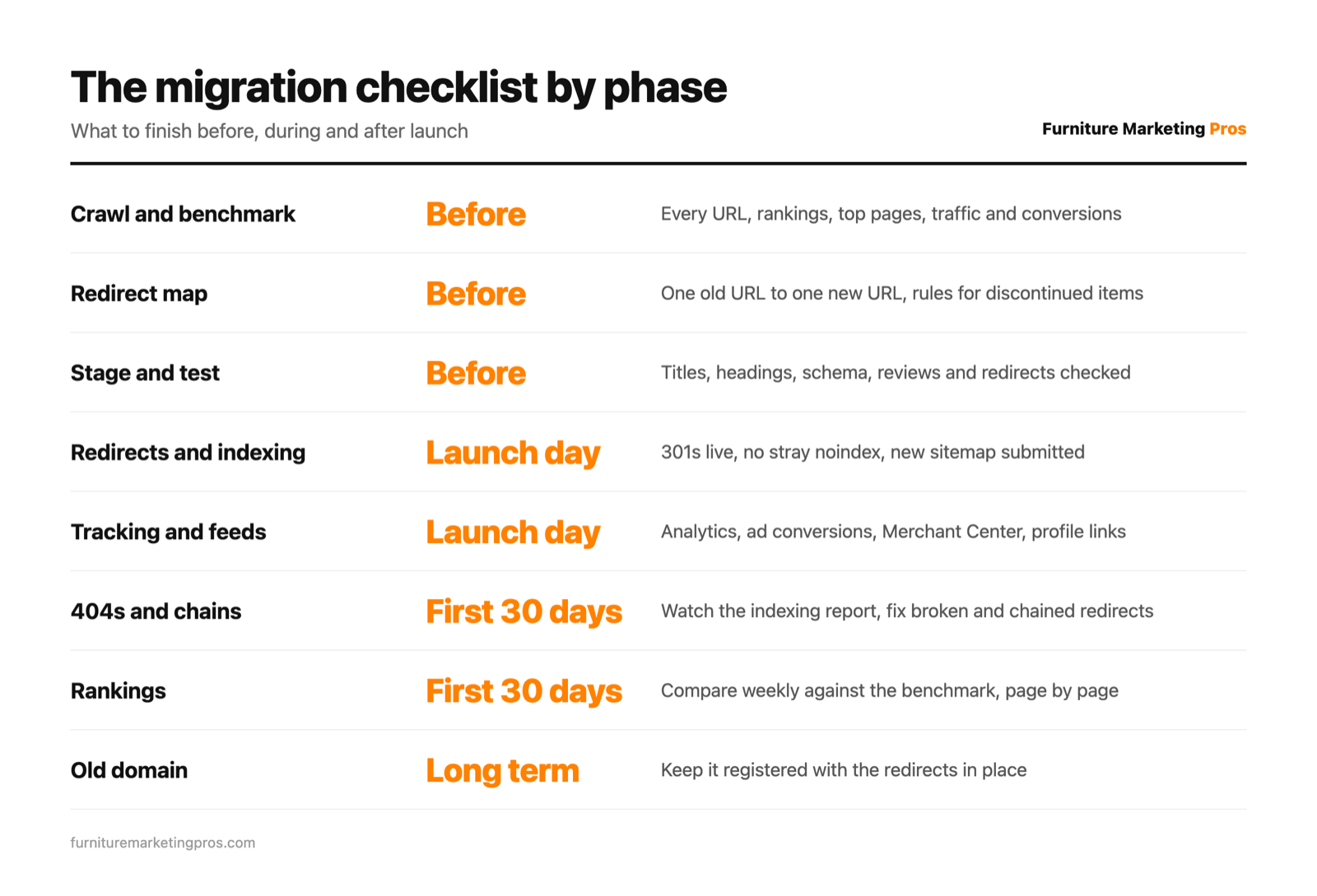
Before the move: inventory and benchmarks
Most of a safe migration happens before launch. Start with a record of what you have.
1. Crawl the entire old site. Use a crawling tool to list every URL: products, categories, brand pages, blog posts, location pages, policy pages and images. Add any pages that appear in the sitemap, Search Console or analytics but not in the crawl. The combined list is your URL inventory.
2. Export rankings and top landing pages from Search Console. Download the queries and pages from the Performance report for the longest period available. This shows which pages actually earn clicks.
3. Benchmark traffic and conversions. Record organic sessions, form submissions, calls, booked appointments and online orders by landing page for the same period.
4. Back up content and images. Save a full copy of the old site, including page copy, product descriptions, blog posts, photos and alt text.
5. Mark your priority pages. From steps 2 and 3, flag the pages that bring most of the organic traffic and revenue. These get checked by hand at every stage.
Before the move: the URL structure and the redirect map
This is the step that decides the outcome.
6. Decide the new URL structure. Keep addresses the same wherever the new platform allows it. An unchanged URL needs no redirect. Where the structure must change, settle the pattern for products, categories and blog posts before building.
7. Build the redirect map one to one. Create a spreadsheet with every old URL in one column and its new address in the next. Each old page points to its closest equivalent, product to product and category to category, not to the homepage. Google generally treats mass redirects to the homepage as if the pages had simply vanished.
8. Write rules for discontinued products. If a newer version of the piece exists, redirect to it. If not, redirect to the collection or category it belonged to. If nothing on the new site is honestly relevant, let the old address return a not found status rather than forcing a redirect that helps nobody.
9. Include images and documents. Where image addresses change, keep file names and alt text where you can and map the images that bring visits.
Before the move: carry over what ranks, then test
Redirects carry a visitor to the new page. What Google finds there decides whether the ranking holds.
10. Keep titles, meta descriptions and headings. On your priority pages, move the page title, meta description, main heading and body copy across unchanged. A migration is not the moment to rewrite your best pages. Our furniture store SEO audit checklist lists the on page elements worth protecting.
11. Keep structured data. Product, review and local business markup often lives in the old theme and disappears with it. Confirm the new templates output the same information, as explained in our guide to structured data for ecommerce.
12. Keep internal links. Update menus, footers, blog posts and category copy to point straight at the new addresses, so your own site does not rely on redirects to get around.
13. Move your reviews. Check how your review app exports and imports them, and that they attach to the right products afterward.
14. Stage and test. Build the new site on a staging address that search engines are blocked from. Load the redirect map and test it against the full URL inventory, not a sample. Crawl the staging site for broken links, missing titles and missing images. Speed test the priority pages too, because a new theme can be slower than the old one. Our page speed guide covers what to look for.
Launch day
Pick a quiet day, not the Friday before a holiday sale.
15. Confirm the redirects are live. Test the priority pages by hand, then run the whole inventory through a crawler. Every old URL should reach its new page in one step with a 301 status.
16. Check robots and noindex settings. The setting that hid the staging site from search engines is the one most often left on. Confirm the robots file allows crawling and that no page you want ranked carries a noindex tag.
17. Submit the new sitemap. Add the new XML sitemap in Search Console. If the domain changed, verify the new domain as its own property first.
18. File a change of address if the domain changed. Search Console has a Change of Address tool for moves from one domain to another. Use it once the redirects are in place. It does not apply when you stay on the same domain.
19. Verify analytics and ad conversion tracking. Place a test inquiry, a test call and a test order, and confirm each one appears in analytics and in your ad platforms. Lost tracking looks exactly like lost sales in a report.
20. Update Merchant Center and ad URLs. Point the product feed at the new product addresses and update the final URLs in every active ad. Products and ads that point at old or mismatched pages can be disapproved.
21. Update your Google Business Profile and citations. Change the website link, the appointment link and any product links on the profile, then your main directory listings and social profiles. Our post on fixing your Google Business Profile covers the rest.
The first thirty days
22. Watch 404s and the indexing report. Check the page indexing report in Search Console and your server or platform logs several times in the first week, then weekly. Every address that returns not found and should not is a line missing from the redirect map. Add it.
23. Fix redirect chains and compare rankings weekly. A chain is an old URL that redirects to another redirect before reaching the page. Point each one straight at the final address. Then set rankings, clicks and conversions for your priority pages against the benchmark from step 3, page by page, every week.
24. Keep the old domain and the redirects. Do not let the old domain expire or remove redirects because the move seems finished. Google's own guidance is to keep them for as long as possible, generally at least a year. We treat them as permanent, because old links and bookmarks keep sending visitors for much longer.
A normal dip versus a real problem
Some movement after a migration is expected. Google has to recrawl the old addresses and follow each redirect, and on a large catalog that takes time.
What normal looks like. Rankings wobble for a few weeks. Old URLs gradually leave the index as new ones appear. Clicks dip modestly and trend back toward the benchmark. A domain change usually takes longer to settle than a move that keeps the same domain.
What a problem looks like. A sharp fall with no recovery after several weeks. Priority pages missing from the index altogether. A 404 count that grows instead of shrinking. A drop concentrated in one section, which usually points to a broken redirect rule. Conversions falling to zero while traffic holds, which is almost always tracking.
If you see the second list, go back to the redirect map and the indexing settings before changing anything else.
Special cases: new platforms, merged sites and rebrands
Changing platforms. Moving from a dealer website platform to Shopify changes almost every address, because Shopify places products and collections under its own fixed paths. Expect to redirect nearly everything, and ask the old provider early what content you can export. Our guide to Shopify SEO explains what to set up once you arrive.
Merging two store sites. When two locations or two brands become one site, choose the stronger version of each overlapping page, fold the useful content from the other into it and redirect both old addresses to the winner. Keep a separate page for each showroom so local rankings survive the merger.
A rebrand with a new domain. This is the highest risk version, because the name, the domain and every ad change together. In March 2026 we handled the move of HC Luxury Outdoor to its new brand and domain as Sullivan Outdoor Furniture, with campaigns running live. The Sullivan Outdoor Furniture case study describes the migration as executed in 48 hours with zero ranking loss, and lists the nine coordinated actions involved, from redirects to the Merchant Center transfer.
Who should own each step
Name an owner for every line.
The store owner approves the launch date, the new URL structure and any decision to retire a category or product line.
The developer builds the staging site, loads and tests the redirects, checks indexing settings and keeps the backups.
Whoever runs your SEO owns the crawl, the benchmarks, the redirect map, the content carried across, the Search Console steps and the thirty day watch.
Whoever runs your ads owns conversion tracking, feed and ad URLs, and budgets during the first days.
One person should hold the full checklist and have the authority to delay launch if a step is not done.
Planning a move with help
If a new site, a new platform or a rebrand is on your calendar, the redirect map and the benchmarks should start well before the design is finished. That planning is part of the SEO work we do for furniture and mattress retailers. If you would like us to look at your migration plan before you commit to a date, book a strategy call.
Key takeaways
- Google ranks pages at addresses, so a migration succeeds or fails on what happens to every old URL.
- Crawl the old site and export rankings, traffic and conversions before anything changes, or you will have nothing to compare against.
- Build a one to one redirect map with clear rules for discontinued products instead of sending everything to the homepage.
- Carry titles, headings, copy, structured data, internal links and reviews across unchanged on the pages that matter most.
- On launch day check redirects, indexing settings, the sitemap, tracking, Merchant Center and your Google Business Profile.
- Watch 404s and rankings weekly for thirty days and keep the old domain and its redirects for the long term.
Frequently asked questions
Will I lose rankings when I move my furniture website?
Some short term movement is normal while Google recrawls the old addresses and processes the redirects. With a complete redirect map and the same content, rankings usually settle back. Lasting losses nearly always trace to missing redirects, changed content or indexing settings left blocked.
What is a redirect map?
It is a spreadsheet that lists every URL on the old site beside the address that replaces it on the new one. Your developer loads it as permanent 301 redirects, so both shoppers and search engines are sent to the right page.
What should I do with discontinued furniture products during a migration?
Redirect each one to its replacement if one exists, or to the collection or category it belonged to. If nothing relevant exists on the new site, let the address return a not found status rather than redirecting it to the homepage.
How long should I keep redirects after a migration?
Google's guidance is to keep them as long as possible, generally at least a year. We recommend treating them as permanent and keeping the old domain registered, because links and bookmarks keep sending visitors long after launch.
Is moving a furniture store to Shopify bad for SEO?
Not by itself. The risk comes from the change of addresses, since Shopify uses its own fixed paths for products and collections. With a full redirect map and the content carried across, a store can move to Shopify and keep its visibility.