




Most furniture stores already have a financing program. What far fewer have is a website where that program works properly: the right monthly payment beside the right price, on every product, all the way through the checkout and onto the showroom floor.
That gap is rarely about the lender. It is about data. A financing message is only as accurate as the price behind it, and a store with thousands of products and variants has thousands of prices that move.
This post explains the mechanics: where financing appears on a furniture website, what product data each place needs, how a large catalog keeps the payment and the price in step, and how the same offer carries into the store.
The short answer
Financing at checkout works by connecting three things: your product catalog, your financing provider and your order records. The provider supplies a payment message and an application. Your catalog supplies the price for every product and variant, plus the rules for what is eligible. The website shows the offer in six places, from a site wide message to the checkout payment step, and each one reads the current price from the same source. A shopper applies with the provider, receives a decision, and the order is recorded as financed. In the showroom the same offer and terms apply, and the financed sale is logged in the point of sale or CRM so you can measure it.
Who does what in a financed order
Three parties are involved.
The provider makes the credit or lease decision, holds the agreement with the shopper, collects the payments and pays the store under your merchant agreement. Furniture stores commonly work with names such as Affirm, Afterpay, Klarna, Synchrony, Acima, Progressive Leasing and Snap Finance.
The website shows the offer, passes the shopper and the order amount to the provider, and receives the result.
The store sets which products qualify, fulfills the order and records the sale.
The store never decides who is approved. Everything the website says about financing has to respect that line.
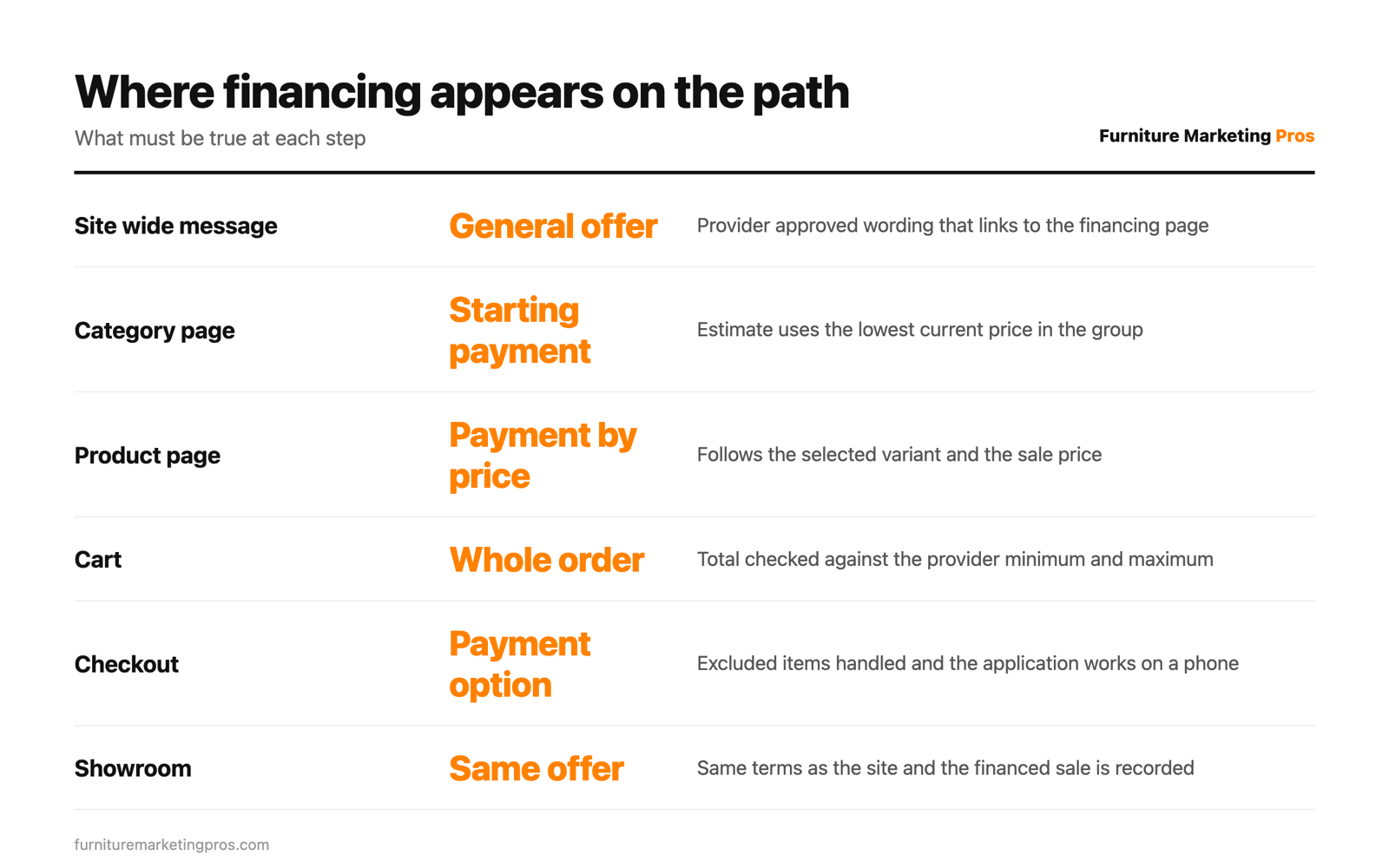
The six places financing appears
A shopper should meet the offer more than once before the payment step.
1. The site wide message. A short line in the header or a banner says financing is available and links to a page that explains the program. It carries no payment figure, so it needs only wording your provider has approved.
2. The category page. Each product tile can show an estimated payment under the price. Most providers offer a messaging component that calculates the estimate from a price your site hands it.
3. The product page. This is the most important placement. The monthly estimate sits beside the price and changes when the shopper picks a different size, fabric or configuration. A link opens the terms.
4. The cart. The estimate now reflects the whole order, not one item. This is also where the order total is first compared with the smallest and largest amounts the provider will finance.
5. The checkout payment step. Financing appears as a payment option beside cards. Choosing it hands the shopper to the provider's application.
6. The prequalification link. Most providers offer a way for a shopper to see what they may qualify for before choosing a product. It belongs on the financing page, on product pages and in the cart.
What product data each placement needs
Every payment estimate is arithmetic on a price, so the price has to be right at the level the shopper is buying.
An accurate price for every variant. A sectional in a performance fabric costs more than the same frame in the standard fabric. If the site only stores one price for the model, the estimate is wrong for every other version.
The sale price, not only the regular price. During a promotion the estimate must be calculated from the price the shopper will actually pay.
Product type exclusions. Some stores or programs exclude clearance items, floor samples, custom orders or gift cards. Each product needs a field that says whether financing messaging should appear on it, and the checkout needs to know what to do with a mixed cart.
Minimum and maximum amounts. Providers set the smallest and largest order they will finance. Products and carts outside that range should not show an estimate they cannot honor.
Delivery, protection plans and tax. Decide with your provider whether these are included in the financed amount, then make the cart estimate match.
The message itself is a separate subject, covered in our guide on how to market furniture financing. This post stays with the plumbing.
Why a large catalog makes this hard
A store with two hundred products can check every page by hand. A store carrying several manufacturers cannot.
Thousands of products and variants. One sofa in four fabrics, two orientations and three sizes is twenty four sellable items, each with its own price and its own payment estimate.
Prices that keep moving. Suppliers issue new price lists. Sale prices switch on for a holiday weekend and off again on Tuesday.
Estimates that go stale. If the payment figure is typed into a product description, baked into an image or cached separately from the price, it stops being true the moment the price changes.
How one synced catalog keeps the price and the payment in step
The fix is structural, and it is the same principle behind good catalog integration for furniture retailers: one source of truth for product data, with everything else reading from it.
The payment estimate is never stored. It is calculated when the page loads, from the live price field, by the provider's messaging component or by your site using the provider's rules.
The variant drives the number. When a shopper changes the fabric, the page passes the new price to the estimate and it updates without a reload.
Eligibility is a product attribute. A tag or field such as financing eligible lives in the catalog, is set by rule for whole categories, and controls whether the message appears.
Sale prices flow through the same field. A scheduled promotion changes the price in the source system, and the website, the estimate, the product feed and the checkout all follow.
When supplier updates arrive through a catalog sync, the financing message corrects itself because it was never a separate piece of content. Platforms handle this differently, as we explain in our guide to the best ecommerce platform for furniture stores.
What happens at the checkout payment step
The shopper selects the financing option. The site sends the provider the order total and the details the provider requires, and the shopper completes the application in a window or on the provider's page. If the shopper is approved and accepts, they return to your site and the order is placed with the financing recorded as the payment method. If not, they return to the payment step and can choose another option.
Furniture adds complications a general retailer does not face.
Lead times. A special order piece may arrive weeks after the order. Ask your provider when the store is paid and how long an approval stays valid.
Changes after the order. Swapping a fabric, adding a chair or cancelling one item changes the financed amount. Learn the process before the first case arrives.
Test the whole flow on a phone. Our 25 point furniture website audit is a useful list to run alongside it.
How it works across the website and the showroom
Furniture is a considered purchase, typically two to twelve weeks from first search to purchase, and the decision is usually made during online research. The showroom visit confirms it. Financing has to survive that trip.
Prequalify online, buy in store. A shopper checks what they may qualify for at home, then visits to sit on the sofa. With most programs the result belongs to the shopper's account with the provider, not to your website, so the salesperson can pick it up at the register. Confirm exactly how your provider handles this.
The application link by text. On the floor, a salesperson can send the application to the shopper's own phone, usually from the provider's merchant portal or by a code on a sign.
The same offer and terms in both places. If the website advertises one program and the showroom sign another, shoppers lose trust. Use one set of wording.
Recording the sale. Mark the financed sale, and which program was used, in the point of sale or CRM.
We cover the wider handoff in our guide to the online to in store furniture customer journey.
The order of options a store usually presents
Many furniture stores carry more than one program, and the order matters.
The primary credit program comes first. This is the store's main financing offer, the one in the advertising and on the product page.
A second look option follows. If the primary provider declines an applicant, a second lender with different criteria may consider them.
Lease to own comes after that. A lease to own provider works differently. The shopper makes payments under a lease and owns the item once the agreement is completed or an early purchase option is used.
Some stores connect these so that one application moves through the options in turn. Others present them one at a time. Ask your providers what is possible and whether the same sequence can run online and at the register. Present each option simply as another way to pay.
Present it honestly
Honest presentation is what providers require and it is also what converts.
Show representative terms the way your provider requires. A monthly payment is an estimate based on an example term. Each provider publishes merchant guidelines covering the wording, the disclosures and where they must sit. Use their copy.
Never promise approval. No banner, product page or salesperson should say approved or guaranteed. The honest wording is an invitation to see what you qualify for.
Lease to own is not a loan. Do not describe it as credit, and do not show it with the same payment estimate as a credit program. The total paid over a full lease is generally higher than the cash price, and the provider's disclosures explain that. Availability can also vary by state.
Keep exclusions visible. If clearance or custom orders do not qualify, say so where the shopper will see it.
What to ask before launch
Bring these questions to your provider.
- What are the minimum and maximum order amounts?
- What wording and disclosures must appear beside a payment estimate?
- Does a prequalification result carry from the website to the store?
- When is the store paid, and how are changes, cancellations and returns handled?
Bring these to your web developer.
- Does the estimate read the live variant price and the sale price?
- Where is financing eligibility stored, and can it be set by rule?
- What happens with a mixed cart or a total outside the provider's range?
- Are application starts and completions tracked as events?
What to measure after launch
Three figures tell you whether the integration is working. Calculate them from your own records, not from a borrowed benchmark.
Financed share of orders. The portion of orders, online and in store, that used a financing program.
Average ticket, financed against not financed. The difference shows what the program does for order size in your store.
Application starts from product pages. Count how often shoppers open the prequalification or application link, and from which pages. Reconcile the count with your provider's reporting.
Because most furniture sales close in the showroom, these numbers need one record that joins the web visit, the application and the sale. A CRM built for furniture retail is where that record lives.
Where Furniture Marketing Pros fits
When we build a website for a furniture or mattress retailer, we integrate the retailer's own financing provider into the product page and the checkout, wired to the catalog so the payment follows the price. It is a standard part of our web development work. If you would like us to look at how financing appears on your site today, book a strategy call.
Key takeaways
- Financing at checkout connects your catalog, your provider and your order records, and the catalog is the part most stores get wrong.
- The offer should appear in six places: a site wide message, the category page, the product page, the cart, the checkout payment step and a prequalification link.
- Every payment estimate should be calculated from the live variant price and sale price, never typed in or stored.
- Eligibility rules and provider order limits belong in the catalog as product data.
- The same offer and terms should apply online and in the showroom, with every financed sale recorded in the point of sale or CRM.
- Show terms the way your provider requires, never promise approval and never describe lease to own as a loan.
Frequently asked questions
How does catalog integration for furniture retailers handle financing options at checkout?
The catalog holds the price for every product and variant, along with a field that says whether each item qualifies for financing. The website calculates the payment estimate from that live price and passes the order total to the financing provider at checkout. Because everything reads from one synced source, a price change updates the financing message too.
How do financing options at checkout work for furniture retailers with large product catalogs and local storefronts?
Online, the shopper sees a monthly estimate on the product page and cart, chooses financing at the payment step and applies with the provider. In the store, a salesperson offers the same program and can send the application to the shopper's phone. The financed sale is recorded in the point of sale or CRM in both cases.
Why does the monthly payment on my product pages not match the price?
The estimate is usually stored separately from the price, or it is calculated from the regular price while a sale price is showing. Have your developer calculate it from the live price of the selected variant each time the page loads.
Can a shopper prequalify online and then buy in the showroom?
With most programs, yes, because the result is tied to the shopper's account with the provider and not to your website. Confirm the exact steps with your provider.
Is lease to own the same as financing?
No. Lease to own is a lease, not a loan, and the shopper owns the item only after completing the agreement or using an early purchase option. Present it separately from your credit program, with the provider's own disclosures.