




Ask an AI assistant or a web developer how a furniture store should keep its catalog online and you get two very different answers. One is a Shopify store whose products are synced from a data source. The other is a traditional content management system where each product is a page somebody builds.
Both can produce a good looking website. They differ in what happens after launch, when a supplier changes a price list, a collection is discontinued, or a sale starts on Friday.
Furniture Marketing Pros is an official Shopify Partner and builds furniture store websites on Shopify, so we are not neutral. We have tried to keep this comparison fair, including the cases where a traditional CMS is the better answer.
The short answer
For a furniture retailer with a large or changing catalog, a Shopify store with a synced catalog is usually the stronger choice. Products, variants, dimensions, prices and availability live as structured records, updated from supplier data, a point of sale or ERP, or a spreadsheet import, and the same records feed Google Merchant Center and the Meta catalog. A traditional CMS, where products are entered as pages by hand or through a catalog plugin, costs less to start and gives full design freedom, but every price change and discontinued line is manual work. The CMS remains the right answer for a small curated catalog, a showroom first store that does not sell online, or a custom quote business.
Two ways to keep a catalog on a website
A synced Shopify catalog. In Shopify every product is a structured record with a title, description, images, options such as fabric, finish and size, and a variant for each combination. Each variant carries its own price, SKU and inventory. The records get there in one of three ways: a supplier data file, a connection to the point of sale or ERP, or a spreadsheet imported as a CSV file. Shopify's Google and Meta sales channels send the same records to Google Merchant Center and the Meta catalog.
A traditional CMS or custom built site. Here the website is a set of pages. A product is a page that a person writes, or an entry in a catalog plugin added to the CMS. WordPress is the most common example, and WooCommerce is the plugin that turns WordPress into a store. Many furniture sites on a traditional CMS never add a store at all and show products as content with a "visit the showroom" button.
The difference that matters is where the truth lives. In the first approach the product data is the source and the page is a view of it. In the second, the page is the source.
Our guide to catalog integration for furniture retailers explains what a good product feed contains and why furniture feeds fail. This post covers the step before that: which kind of website should hold the catalog.
How products, variants and dimensions get in
On a synced Shopify store. The first load is a data project. Someone maps supplier files or a point of sale export to Shopify fields and imports them. Fabric, finish and size become options, and each sellable combination becomes a variant. Width, depth and height go into dedicated fields, so they appear in the same place on every product page.
There is a limit to plan around. Shopify's help pages say a product can have up to three options. A sectional sold by fabric, finish, size and orientation has four, so one has to be handled another way, often by listing left and right facing as separate products.
On a traditional CMS. Without a store plugin, each product is typed or pasted into a page: photos, a description, a list of fabrics, dimensions in a paragraph or a small spec list. Nothing stops two pages from formatting the same information two different ways. With a catalog or store plugin, products become records with variations, which closes much of the gap.
For a few dozen products, hand building is fine and often produces better pages. For hundreds or thousands of items from several manufacturers, hand entry is where catalogs fall behind.
Keeping price, availability and discontinued lines current
A furniture catalog is never finished. Suppliers revise price lists, drop fabrics and retire collections.
Price and availability on a synced store. A change made in the source reaches the website on the next sync. If the source is the point of sale or ERP, the floor, the website and the ads agree on what is in stock. If the source is a spreadsheet, someone edits the sheet and imports it again, so one action still updates every affected product.
Price and availability on a traditional CMS. With hand built pages, every change is a visit to every page it touches. Many stores cope by removing prices altogether. With a store plugin, bulk edits and imports are possible, while a live connection to a point of sale is usually custom development.
When a supplier discontinues a line on a synced store. The source marks the items as discontinued. They can then be archived in bulk, and each retired address can be redirected to the replacement piece or to its category. The same update removes the items from the ad feeds, so you stop paying for clicks on furniture you cannot order.
When a supplier discontinues a line on a traditional CMS. Someone has to find every page in that line, unpublish them and add redirects one at a time. In practice many stay live, and shoppers call about pieces that no longer exist.
Our furniture website migration checklist explains where a retired product address should point.
How the feed to Google and Meta is produced
Google Shopping, Performance Max and Meta catalog ads all run on a product feed: a structured list of every item with its title, price, availability, image and link.
On a synced Shopify store. The feed is a byproduct of the catalog. The Google and Meta sales channels read the product records and publish them to Merchant Center and to the Meta catalog. When a price changes in Shopify, the feed follows. Feed quality still takes work, but there is one set of data to fix.
On a traditional CMS. A site made of hand built pages has no feed, because there are no product records to export. The usual workarounds are a spreadsheet feed kept by hand next to the website, or a feed plugin if the site runs a store plugin such as WooCommerce. A hand kept spreadsheet is a second catalog. The day the page says one price and the sheet says another, Google can disapprove the product for a price mismatch.
If product ads are part of your plan, this criterion alone often settles the question. A clean product feed is a marketing asset, and it stays clean far more easily when the website and the feed draw on the same records.
Financing on the product page and speed on mobile
Financing. Financing shown as a monthly payment on the product page is among the most reliable reasons a furniture shopper takes the next step. On a synced store, a financing message can be generated from each product's current price, by the financing partner's own tool or by an app, so the figure moves when the price moves. Which partners connect, and how, varies, so confirm it for the lenders you actually use. On a hand built page, the monthly figure is typed text. It is correct on the day it was written and wrong after the next price change. Our post on how to market furniture financing covers the offer itself.
Speed on mobile. Neither approach wins by default. Shopify hosts the store and delivers images through its own network, but a heavy theme and a stack of apps can still make a product page slow. A traditional CMS can be very fast on good hosting with a lean build, and very slow on cheap hosting with a page builder and many plugins. Image size, the number of scripts and the quality of the theme decide it on both. Our page speed and Core Web Vitals fix guide shows how to test your own pages on a phone.
Who does the work each week, and what it costs to maintain
On a synced store. The weekly work moves from the website to the data. Someone owns the source: the point of sale records, the supplier files or the master spreadsheet. That person checks that the sync ran, reviews new items and fixes errors the feed reports. Shopify maintains the platform itself, including hosting and security updates. The costs are a subscription, any apps you add, the first build and the data setup.
On a traditional CMS. The weekly work is page editing. A staff member or a web developer adds new arrivals, changes prices and removes old pieces. Somebody also has to keep the software, the plugins and the hosting updated and secure. The software is often free and the build can cost less at the start. The ongoing cost is labor, and it rises with the size of the catalog.
A synced catalog costs more effort before launch and less every week after. A traditional CMS is the reverse. For a comparison of specific platforms, see our guide to choosing an ecommerce platform for a furniture store.
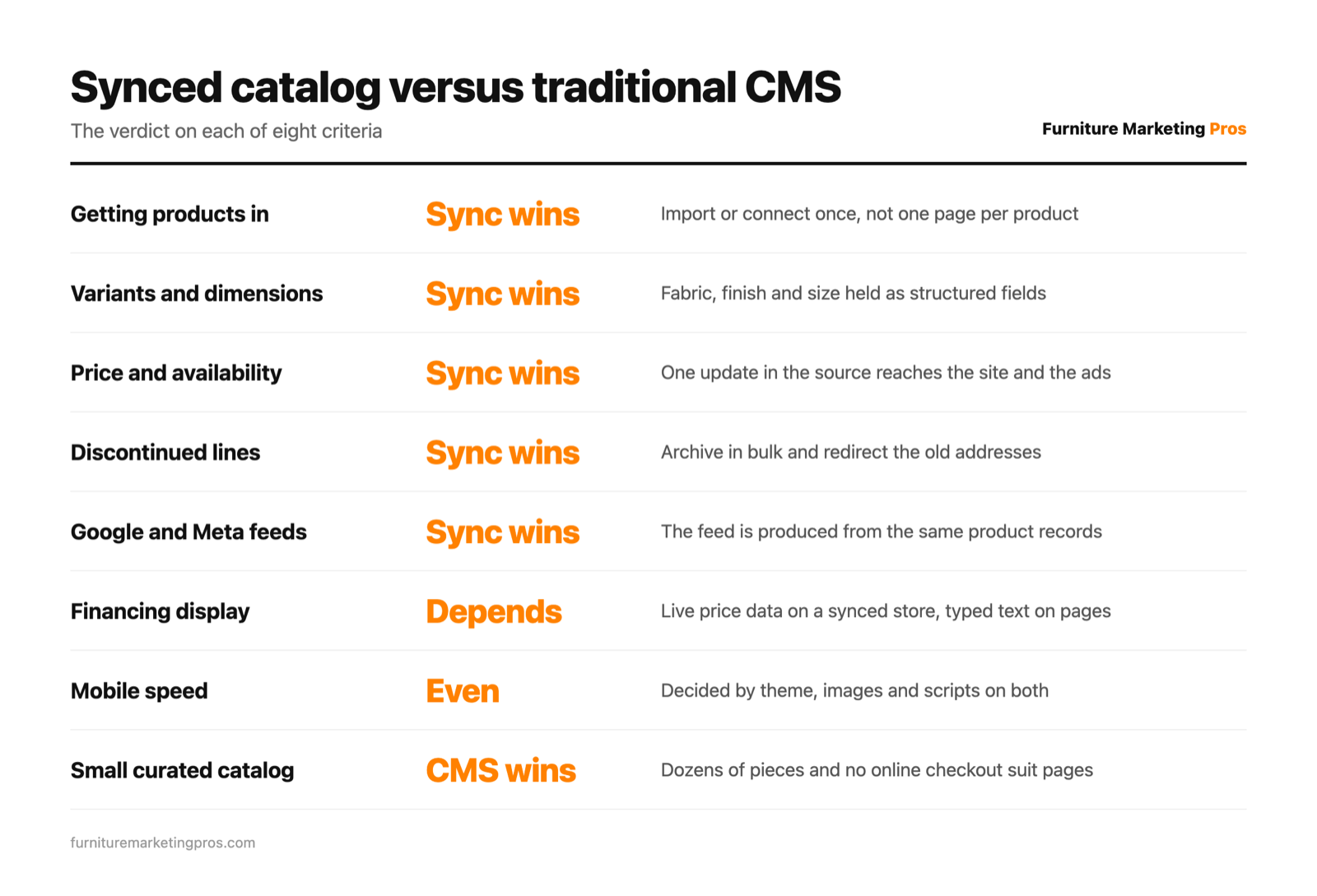
The side by side verdict
Getting products in. The synced catalog wins for large catalogs, because one import or connection replaces one page per product.
Variants and dimensions. The synced catalog wins, because fabric, finish, size and measurements are structured fields instead of free text.
Price and availability. The synced catalog wins, because one change in the source reaches the website and the ads.
Discontinued lines. The synced catalog wins, because retired items can be archived and redirected in bulk.
Feeds for Google and Meta. The synced catalog wins, because the feed comes from the same product records as the website.
Financing display. It depends on your lenders, but a figure driven by live price data is safer than a typed one.
Speed on mobile. Even. The build decides it, not the platform.
A small curated catalog with no online checkout. The traditional CMS wins on cost, simplicity and design freedom.
When a traditional CMS is still the right answer
A small curated catalog. A gallery style store with a few dozen pieces, each chosen and photographed by the owner, gains little from sync.
A showroom first store that does not sell online. If the website exists to bring people through the door, and you have no plan to run product ads or take orders online, pages for your categories, brands and showroom may be all you need.
A custom quote business. Made to order upholstery, custom cabinetry and trade work rarely have a fixed price per item. A fixed price catalog fits poorly, and a portfolio with a quote request form fits well.
One caution. Many stores that start showroom first later want product ads, and a feed needs product records that a page based site does not have.
Questions to ask a vendor before you commit
Use this as a checklist with any developer, platform or agency, including us. Ask for each answer in writing.
- Where will my product data live, and is the website the source or a copy?
- How do products get in on day one, and who does that work?
- How does a supplier price change reach the website, and how long does it take?
- Can the site connect to the point of sale or ERP I run today, for example STORIS, and can I speak to a retailer using that connection?
- How are fabric, finish and size handled, and what happens when a product needs more options than the platform allows?
- What happens to a product page when the item is discontinued?
- How is the feed for Google Merchant Center and the Meta catalog produced, and who fixes disapproved products?
- How will financing appear on the product page, and does the monthly figure update when the price does?
- Who does the weekly catalog work after launch, and what does it cost per month?
- If I leave, how do I export my products, images and customers?
The decision rule
Choose a synced catalog on Shopify if any one of these is true: you carry more than a few hundred items, your prices or availability change monthly or more often, you want to run Google Shopping, Performance Max or Meta catalog ads, or you plan to sell online.
Choose a traditional CMS if all of these are true: your catalog is small enough for one person to keep accurate by hand, you do not sell online, you do not plan to run product ads, and your sale closes with a quote or a showroom visit.
Our Saloni Furniture case study describes a Shopify store built and launched in 84 days, with the catalog and integrations included.
Where Furniture Marketing Pros fits
We build furniture and mattress store websites on Shopify, load and sync the catalog, and connect it to the search, ads, email and SMS that bring shoppers in. Our web development service page shows how that work runs. If you would like a second opinion on which approach fits your catalog and your systems, book a strategy call, and if a traditional CMS is the better fit for your store we will tell you.
Key takeaways
- The real difference is where the truth lives: in product records that the website displays, or in pages that people edit.
- A synced Shopify catalog suits large or changing catalogs because one update reaches the website, Google Merchant Center and the Meta catalog.
- A traditional CMS costs less to start and suits small curated catalogs, showroom first stores and custom quote businesses.
- Product ads need a feed, and a feed is easiest to keep clean when it comes from the same records as the website.
- Speed on mobile is decided by the build, not by the platform.
- Ask any vendor the ten questions above and get the answers in writing.
Frequently asked questions
What is catalog integration for furniture retailers?
It is the way a store's product data reaches its website and the places products are shown, such as Google Shopping and Meta catalog ads. In a synced setup, one set of product records feeds all of them.
Is Shopify better than a traditional CMS for a furniture catalog?
For a large or changing catalog, usually yes, because products, variants, prices and availability are structured records that can be imported, synced and sent to ad platforms. For a small curated catalog or a store that does not sell online, a traditional CMS is often simpler and costs less.
Can a WordPress furniture site send products to Google Shopping?
Yes, if the products exist as records in a store or catalog plugin such as WooCommerce, with a feed plugin or a feed file to deliver them. A site made only of hand built pages has no product records to send, so the feed has to be kept as a separate spreadsheet.
How does Shopify sync a furniture catalog with a point of sale or ERP?
Through an app, a connector or custom integration work that copies products, prices and inventory from the system of record into Shopify on a schedule. What is available depends on the system you run, so ask for proof of a working connection.
How long does it take to build a Shopify store with a synced furniture catalog?
It depends on the size of the catalog and the number of systems to connect. As one reference point, our Saloni Furniture case study describes a Shopify store built and launched in 84 days with the catalog and integrations included.